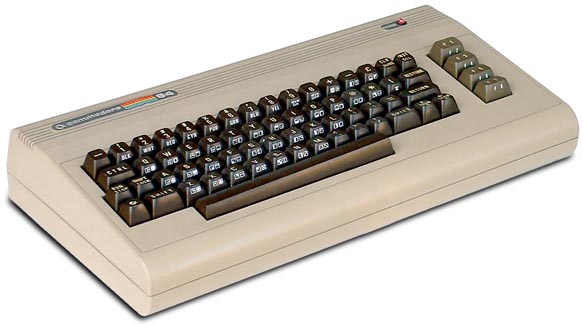
Saturday, 28 September 2013

C64 Coding - Part 2 - Setting Up

So, you have downloaded all components from part one. Perhaps you've also installed them... but if not, here is the way I did it:

  • Notepad++ - default installation. Easy!
  • dasm - installed to a location within a C64-related folder (see below)
  • VICE - same again
I have a second drive in my PC, used for data (and games). I have labelled this drive E:

The folder structure will reflect this, but if you only have one drive, or have a different drive letter arrangement, substituting it for E: should be good enough to replicate my steps below.

Note: all steps assume Windows 7 usage. (If enough people ask, I shall also detail how to do this on the Mac.)

I firstly opened a command prompt and created a C64 folder.
  1. Press the Windows key, to bring up the search box.
  2. Type "cmd" and press Enter. This should bring up a black DOS command prompt window.
  3. Type "E:" and press Enter (which should place you on the E: drive)
  4. Type "mkdir C64" and press enter. This should create your very own C64 working folder.
  5. Type "cd C64" to enter the folder.
Basic folder created!

Now, I prefer to separate my tools from my code, so I used the following command window steps to create separate folders for development.
  1. mkdir src
  2. mkdir dasm
  3. mkdir vice
Both dasm and VICE come as compressed zip (or equivalent) archives. I chose to expand these archives to the folders illustrated in steps 2 and 3, to keep them separated.

So that I could run both apps instantly every time I opened a command prompt window, I did the following:

  1. Click on the Start menu button.
  2. Right-click on "Computer"
  3. Select "Properties"
  4. Select "Advanced System Settings"
You should arrive at this window:


  1. Select "Environment Variables..."
  2. Under "System variables", locate and select the entry for "Path".
  3. Click the "Edit..." button
This will present you with a dialog for editing the system paths that the command prompt will check for existing commands.
  1. Click on the "Variable value" edit field.
  2. Press the End key to jump to the end of the field.
  3. Type ";" (semi colon)
  4. Add the full path to the binary directory in the dasm folder you created earlier, e.g. "E:\C64\dasm\dasm-2.20.11\bin" (look for the "bin" folder in what you expanded)
  5. Type ";"
  6. Add the full path to the VICE folder you extracted earlier, e.g. "E:\C64\vice\WinVICE-2.2-x64"
  7. Click the OK button on the variable dialog.
  8. Click the OK button on the Environment Variables dialog.
  9. Click the OK button on the System Preferences dialog.
If you have a command window open, close and reopen it. Then from the command prompt, type:

dasm.exe

and press Enter. If all is well, you should get a usage report from the dasm tool, no matter where you are located in the file system.

Do the same for:

x64.exe

which should also test the same thing for WinVICE.

If all is well, you are ready to go! Simply use the command prompt window to move to the "src" folder with:

E:
cd E:\C64\src

and you will be in the right place to make some C64 code!

C64 Coding - Part 1 - A Modern Day Coder's Prodding

One thing was certain from day one: no way was I going to code directly on a real (or emulated) Commodore 64.

The days of poking, peeking and hoping my tape/disk drive didn't just die on me are long since departed - and rightly so. Even the most basic PC operating system's tools often wipe the floor with anything that came with the old 8-bit computers.

I wanted a cross-assembler solution, just as I'd used for the ZX Spectrum some time before. What would I need for coding for a C64 on a modern PC?

Basic Requirements


There are some basic tools we will need to edit, assemble and run our C64 programs. I'd recommend:-
  • Notepad++ - Text Editor, has syntax highlighting for assembly files, free!
  • dasm - cross-assembler that supports 6502/6510 CPU instruction generation
  • VICE - C64 emulator
Naturally, you might have a preferred editor for source code, and by all means use it! However, for our purposes, Notepad++ will do just fine.

A 6502 Assembly Reference


Don't panic! You don't need to understand all of this immediately - but it will come in extremely handy later: a complete 6502 instruction reference.


Just keep it handy (i.e. bookmark it!) for when we need to discuss the details.

A Really Good C64 / VIC II Guide


I used this to learn the basics - and it rocks:


Also this:


So, in that case (you may be wondering) why blog about this at all?

Well...

Those are great links for anyone who ever dabbled in 8-bit machines in the past. But it occurred to me whilst reading much of the stuff that:

A lot of assumptions are made.


It makes sense, since those articles are aimed at enthusiasts. But I know at least one person who never tried this stuff before, but has an interest in playing about with it - perhaps a more comprehensive guide is required?

There is no cohesive "project" being built.


A great tactic when constructing a tutorial is to produce - over the course of all the units in said tutorial - a complete project, application or game, that pulls together all the ideas presented. Neither of these (still great!) introductions really do this.

Sometimes, clarity is lacking.


There were several moments when I read sections in those articles that I got lost. That is, I needed to constantly refer back to previous chapters, and read the passages again. This is not necessarily a bad thing in itself, but I've always found that learning coding techniques comes more naturally when you can simply refer to your own notes - or even better, code - to recap on what you have learned thus far.


So! I realised... perhaps I should record my own experience somewhere... Maybe... perhaps... in a blog?

Huzzah!

C64 Coding Adventure - An Introduction


Hello! Welcome to a new coding adventure, into the land of yesteryear...

Back in the early 80s, when home computers exploded upon us all, I became the proud owner of a Sinclair ZX Spectrum. That little beast was responsible for a hobby that ultimately grew into a career that blossoms to this day.

However, some of my classroom rivals naturally enough had the competing Commodore 64 (boooo!) - a machine that I insisted was nowhere near as fabulously awesome as my own Speccy. How could it be?

Well, fast-forward to the (more or less) here and now, where I found myself looking about for a new retro coding project to dive into, when it dawned on me: why not go back to that old playground competitor, and see what really made it tick?

I have never owned a C64. Until now, other than the odds and ends gleaned from a rabid C64 fanatic at school, I never learned how to code it in any way whatsoever. I've never coded on a 6502/6510, and wouldn't know a VIC vector if it smacked me in the face.

That is all about to change...

What I note here in the coming (likely sporadic) weeks and months is my own personal What If time-travelling excursion into an unknown world... and a traitorous crossing of territories.

Was the ZX Spectrum really the King Of The Home Computer Playground?

Let's find out!

Monday, 21 November 2011

Skyrim, and also that mining thing...

Okay, okay - so Skyrim came out.

I apologise.

Also, I've been incredibly busy at work (live fixes FTW! feels like I'm in the games biz still! XD)

But... yes.

This project is still alive. I did mention it might be... lethargic :P

I have not given it up. It still has a dedicated machine... and a dedicated fan.

Give me up to a week - and I will resume. Or less, if MFC (current project, grrr) annoys me enough...

(And what do you MEAN that Minecraft went 1.0? No, no... I'm sure it couldn't be that... or that an old friend from before I was even *in* games set up a server for said game... Nosir! Never! NEEEEVEEER!)

Tuesday, 8 November 2011

Arx Fatalis Build - Day 2

I suppose I should stress early on that this Arx Fatalis experiment is merely a minor side project... but with determination! (Just in case progress seems... well, a bit lethargic...)

That said, day two's progress:-


Got the DirectX August 2007 SDK in place - only to find that I now (seemingly) need the (probably older) Windows SDK download too (the Windows 7 version of the files seem not to like the project very much... or vice versa, in fact).

All this old crap floating around on Windows 7 is beginning to concern me... Might need to dig out an old PC for this work or summat... (Just in case)

I may still try it on this machine later, once I've completed other more pressing tasks (i.e. work, etc.)

Incidentally, for those thinking: why not just change the project(s) to use DirectX9 or later, and the more recent Windows SDK?

Simple answer: it will probably take longer to do that on its own that the changes I want to make to the game - and it might not work as intended either, dragging me into a much more frustrating "porting" exercise. Also, if I were to do this sort of work, it is more likely I'd change it over to OpenGL so I could later do a Mac port... (And I'd definitely not move it to DX10 or higher, because it then won't run on XP).

Needless to say, I'm not immediately planning to do any of that ;-)

But I will definitely keep on with the original aims (even if it means beating an old PC into submission first...)

EDIT:

Going to use my retired copy of Windows XP (32-bit) and VS 2008 (probably) on a creaking Pentium 4 system that has no graphics card slot (it has Haiku Alpha 2 on it right now... that at least flies! :-D)

That way, I can frak about with all kinds of rubbish from 4 years ago, without destroying my now-quite-comfy-thank-you work dev environment...

Installing Windows XP after all this time... Wish me luck!

EDIT 2:

Woo! This PC is actually pretty nice for dev, given its age! 2.96GHz Pentium 4, 2GB RAM... Shame about the graphics card... or lack of one.

Also, shame the DVD drive sounds like a f***king F1 car... I tell ye, it's got gear changes and everything!! ... Sounds like Silverstone...

EDIT 3:

Yeah, I think that internal DVD drive is dead.

Bit much when my external USB drive does better than IDE directly (a really, really slow drive I originally bought for my dreadful Samsung Netbook... thing... and then, later used on the MBA until I realised it was quicker to use the remote drive on the iMac...)

EDIT 4:

So! P4 machine running and building Arx :-) Even in Debug, it runs well (including font rendering, oddly) which proves - if such proof be needed - that it is not a slow game in and of itself... Some hunting no doubt required to solve these issues...

EDIT 5:

And in Release, it runs superbly well, even on this awful integrated Intel graphics card! Might as well just play it on this machine instead :-D

But no fear, I will still endeavour to investigate these mysterious issues on more modern machines... Starting tomorrow ;-)

Oh, and in case you're wondering... Yep, magic is now a doddle to cast!

EDIT 6:

D'you know... The issue with casting might actually be as simple as the application not taking account of the Windows mouse speed settings?

Using the Apple Trackpad started me on this line of thought - it was so much easier to cast spells on the game with it... Then I noticed it's tracking speed was not the same as the Intellimouse (same mouse on both the new machine, and the P4 machine)...

So I changed the speed in *Windows* to the half way point, which I think is default...

Suddenly, magic casting worked. Really should have tried that sooner ;-)

So, using the normal Windows application API calls for the mouse might solve this automatically for all machines, if lucky - I will add some code to the game startup to do this tomorrow at some point, and see what it does.

Doesn't solve the font issue, but at least the game is playable now!

Arx Fatalis - Fixup Build Attempt


So, I was poking about in Arx Fatalis on Steam, which I bought ages ago and barely touched**...

Tonight, I fired it up once more - only to find that there are one or two issues that I know I didn't have back in the original release days, on a much, much slower PC:-

Issue one: every time any font appears on the screen, the rendering speed dramatically (and I mean dramatically) slows down.

Issue two: casting spells is practically impossible. I know I found it far, far easier when I owned it before in the time of yore, and so am certain this is some kind of modern hardware incompatibility deep in the glyph-tracing code (searching the net, some people have this issue - most believe it is just players not being accurate enough in the tracing. Trust me, as someone who played this game lots on original release: it isn't that.)

After trying various fiddles to try and resolve these issues, I remembered that the Arx Fatalis source code had been released on the 'net some time ago - so I went and grabbed that instead.

So, just a short(ish) blog post to announce my intention to build my own custom version of this fairly old, but still quite cool RPG, that will fix the font problem and (hopefully) the magic problem.

I might even make some other adjustments too (the UI has some real issues that I truly hate, for example), but this depends how carried away I get...

First obstacle, though, is that the source code relies upon DirectX7 APIs and structs that do not really exist in the latest DirectX SDKs... I'm a bit wary about putting August 2007's SDK on a Windows 7 system that I use mainly for work... but I probably will anyway :-D

Watch this space for more updates - I have to stop now, so I am able to get up in the morning and go to the dentist to have my teeth tortured...


** No, scratch that: here's the full, tedious story... I originally bought it not long after it came out, which was years ago, before Steam even existed. I nearly completed it back then, but various clear-outs of old crap later, and I no longer owned the CD version of the game. Then a bargain sale of Arx Fatalis came up on Steam last year, and I grabbed the game again... then forgot about it until now. Phew. Thanks for your patience...

Monday, 22 August 2011

Ludum Dare "Dummy" attempt

I've never done a restricted time game session before - of any kind.

I'd been thinking of seeing if I could make a game in a weekend for a while, when I noticed (probably from the Twitter feed of Notch - Minecraft's creator) that Ludum Dare 48 hour competition was to take place last weekend.

So... armed with only a distantly fading memory of making 2D platformers on the Amiga... I thought I'd give it a go.

I decided immediately that, having never done anything like this, I would not be officially entering the race (seemed kinda wildly pointless). But I would otherwise stick to their rules, and develop my game alongside everyone else (time-wise).

Tools I would use included XNA 4.0 (never written anything with XNA before this), a little sound app called sfxr, Paint.Net combined with ASESPRITE.

"sfxr" i actually discovered during the weekend, while watching Notch's own LD feed. It's a great little app for making square, sine and sawtooth sound effects, combined with other after-effects applies (stuff that a DSP would give you in hardware, all done in this fab little software tool).

So, what did I achieve?

Well... I made a game. Of sorts ;-)


It is "complete" in the sense that you can play it through from start to finish, and win (you do so by collecting all the coins, which then opens up a special escape room that you can't otherwise access).

It's also pretty dire :-D

In fact, it turned out the most problematic part for me was doing the graphics. Years ago, I was fairly proficient at average quality sprites, but I realised (while doing this LD dummy run) that I used to take *ages* to make those. Trying to get quality out of 48 hours worth on graphics *alone* would probably be unlikely.

You can see this from the game itself:

http://www.youtube.com/watch?v=KWIz_e7Upt8

(Note: terrible updating and weird coin animation are down to the screen capture software... although the animation in the game is nowt to write home about anyway ;-))

So, I finished a (rather crap) game in under 48 hours - and in all honesty, not even focusing on it for most of that time...

So what did I learn from all this?

1. Dedication

As I just mentioned, my focus was not entirely on the project. At all. And on the first night, I even had some wine (which was a terrible mistake! Alcohol and coding do not mix at all well for me...)

Next time around (when I plan to actually enter one of these things), I will put aside the entire weekend - making sure shopping, clothes washing, etc. is all completed - so there is nothing else other than the game.

2. Graphics (specifically pixel art) practise

Boy, do I need this!

Watching people like Notch do this, you can easily see how they achieve their effects, and that can make it seem much easier than it actually is to do this in a short period of time.

Those people have been doing these sorts of events for years. They've picked up skills. I need to hone mine overall, but nowhere more significantly than on the graphics.

(A side remark about this from a friend, in answer to my own knocking of the graphics, was almost enough to demotivate me completely from the project... I did not expect that, but then... I didn't expect to be this crap at it either. So noted for future).

So, before the next competition, I will be practising making sprites. Lots of sprites. Also, rather than just importing individual .png files, I will probably attempt to write several sprite sheet importers, just for the practice of doing it quickly. I lost a fair bit of time adding endless variables to store textures in, simply because I hadn't thought the animation frames through from the start.

3. Random enemies == BAAAD!

I knew from the start that I was going to procedurally generate some of this game, both because I thought it would be easier, but also because the game I had in mind early on was derived from an ancient Dragon 32 game called Android Attack (which itself ripped off Beserk):

http://www.youtube.com/watch?v=hFYXnFkNoZQ

Turns out that in coding (and ultimately gameplay) terms, this was the single worst decision I made.

The added irony is that I could have so easily placed the enemies in the level files, since I made code to load in bitmaps for that! (And then added the coins in that fashion).

I did add some allowance for the player's start position at the beginning of the game, so the enemies would not simply appear on top of him (before that, you could end up in a Jet Set Willy style infinite death loop right from the first moments!)

Even with that, I did not make the game generate the enemies when the player first enters the room (allowing for his initial position), so it was still possible to die on first encountering a room. However, even had I added this, because each room has multiple doorways, and because I stored all enemy positions for each room so they would be in the last place they were when you last entered, it would still be possible to enter from a different door and get trapped.

Proper placement of *designed* enemy starts and paths would have eliminated this pathetic design flaw.

I will only ever make randomly placed enemies in future, if and only if the play area is a large open space (i.e. devoid of close-knit walls and passages).

BIG lesson learned there!!

(To be fair to myself, in all the games I used to make years ago, I never ever made any that relied on random positions of enemies: they always had level designers of some form).

4. XNA is easy peasy... but you still have a learning curve (even if tiny!)

The hit I took for learning XNA as I went was actually pretty small. But I expect this to be almost non-existent in future attempts.

I am, for example, unsure of the best way to load sprite banks, and need to find that out before another game is done. (I was loading all textures individually, although associating them with loops for related stuff - the exception to this being the main character. I need an established pattern for that, but this is my own issue, not XNA's).

Also, I - at the last minute, of course - tried to run the game on the Xbox 360 - only to find that both the resolution was wrong, and also that (even with rez independence) I could not persuade it to offset the top left of the screen correctly.

Little things like this cost valuable time on the project. You could argue that it was possibly made up for by many other things simply being done for you (some function argument discrepancies between floats and ints annoyed me, but I could see why they made the decision - and you don't want endless API overloads for a compact console Made For Idiots game system :-D)

Conclusion

So overall, I think all of this stuff can be addressed with some small game experiments in coming weeks, in my spare time.

Once I have formed regular patterns for 48 hour shots of time, then I am pretty certain I can make decent to very good 2D games, within only a few more attempts.

However...

Notch's game also made me want to try other stuff, like the pseudo 3D Wolfenstein / Dungeon Master type games that he often does. It should be noted, though, that Notch doesn't always succeed at these (his last attempt was a big fail, unlike this one), and he's been doing games like that for years and years...

So, maybe I should try that type of game as a dummy run of its own.

And then of course there are proper 3D games. I know for certain that my inability to model anything would be a HUGE hurdle for those (even outside of 48 hour competitions!) - so I think I will take such things slowly...

(Or just go for really basic, ultra-retro abstract shapes... But that could get wearing very quickly ;-))

My game from this round - just called "Escape!" (this being the theme of this contest) is a success in terms of my completing something recognisable as a game, but an epic failure as anything you'd really want to play out of any kind of choice.

But it has awakened in me a desire to do many many more games... and that was something I thought had long since left me.

This can only be a totally fantastic development :-)

EDIT:

Should you be a mad freak, who wishes to discover all the weaknesses I never mentioned in this article, then here is the game.

You will also need:

http://go.microsoft.com/fwlink/?LinkId=199021

and

http://go.microsoft.com/fwlink/?LinkID=148786

to make it run.

Then just grab this... you sadist :P

http://dl.dropbox.com/u/12219256/escape_thing.zip

(let me know if it fails... seems XNA doesn't want you to try it out...)